Google Ads Transparency Center: how to check any advertiser in 3 steps
Google Ads Transparency Center is Google’s free ad library: type an advertiser’s name or website to list its ads on Search, YouTube, Play, Maps and Shopping. It cannot search by keyword, and outside Europe it shows only the ad, its format and its last shown date.
| What you get | Ads shown in the US | Ads shown in the EEA or Türkiye |
|---|---|---|
| The ad itself, up to 5 variations | yes | yes |
| Advertiser name, location, payer | yes | yes |
| Last shown date | yes | yes |
| First shown date and topic | no | yes |
| Times shown | no | range, with a 90-day delay |
| Targeting categories used | no | yes, included or excluded |
| Amount spent | no | no |
| Click-through to the landing page | no | no |
Data on 8 October 2026, from Google’s own Transparency Center FAQ and our session in the tool.
How to use Google Ads Transparency Center in 3 steps
Section titled “How to use Google Ads Transparency Center in 3 steps”Checking any advertiser in Google Ads Transparency Center, often called simply the Google Transparency Center, takes three steps. Open adstransparency.google.com, type the advertiser’s name or website into the single search field, and pick the advertiser from the suggestions. Then narrow the list with the date, region, platform and format filters. Finally, open any ad to see its details.
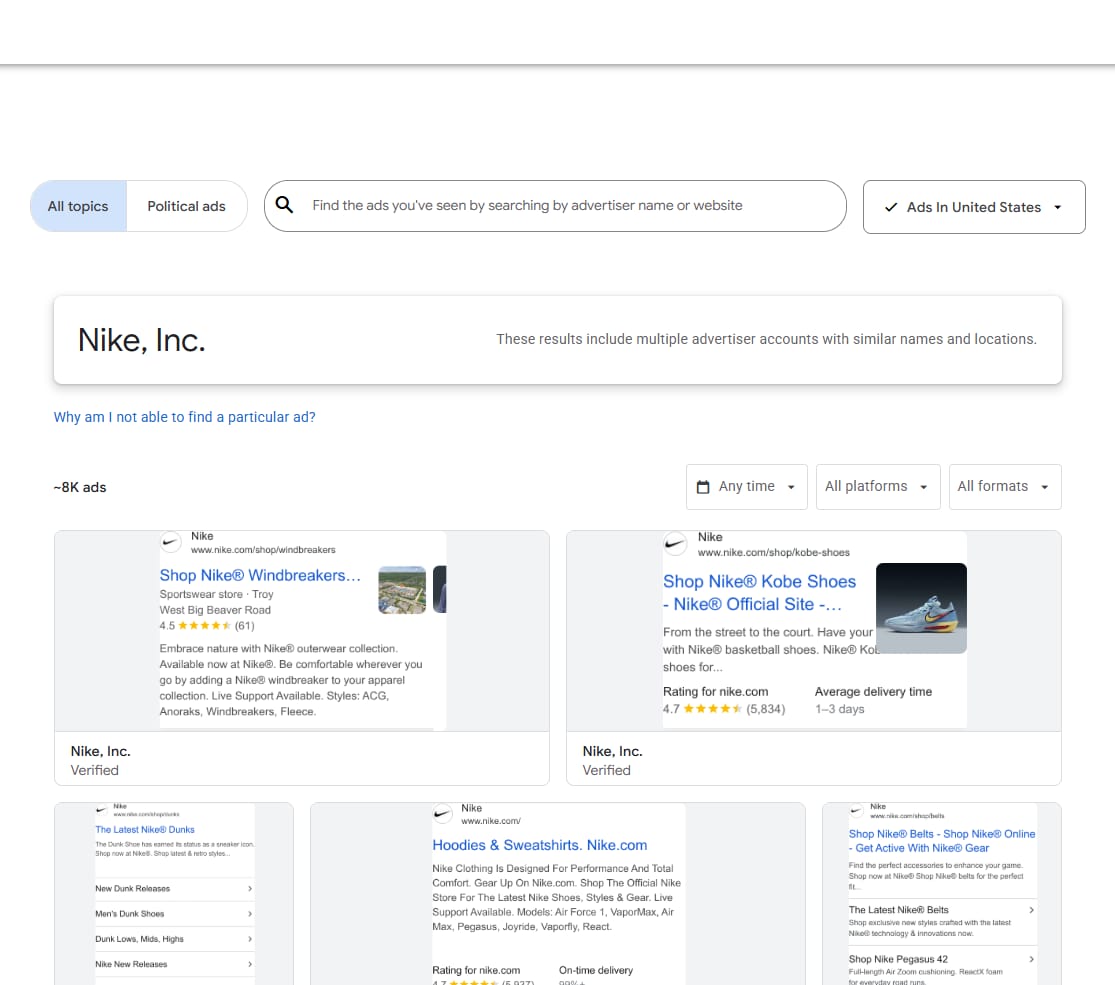
A domain search is often more useful than a name search. When you search a website, Google groups every advertiser account whose ads point to that domain, so resellers and agencies running ads for the same site show up together.
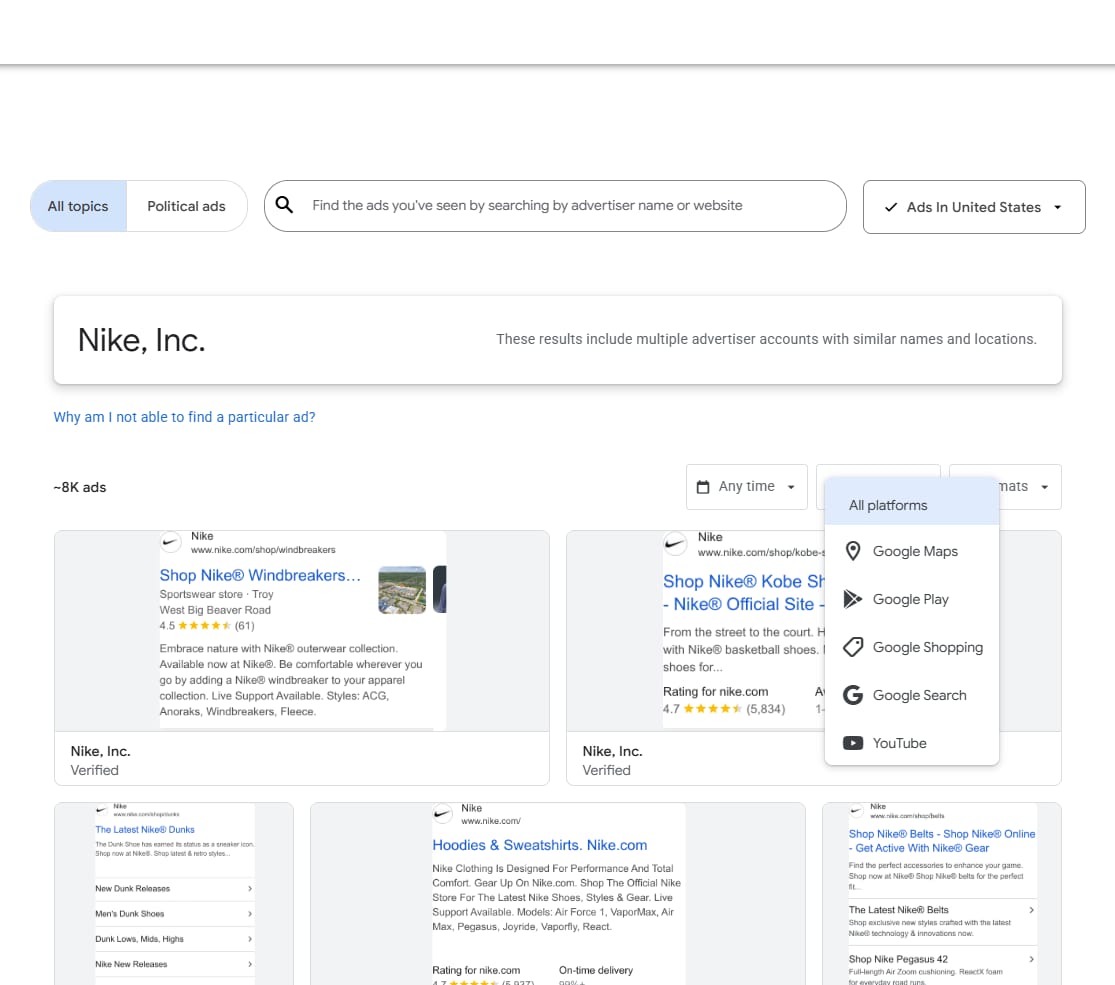
Google ad library search: what you can and cannot look up
Section titled “Google ad library search: what you can and cannot look up”The Google ad library search works only by advertiser name or website. Google’s help describes no search inside ad text, so you cannot ask it “who advertises running shoes” the way you can in the Meta Ad Library. To research a market in Google Ads Transparency Center you first need a list of the advertisers or domains you want to check.
What Google ads transparency shows for a US ad and for an EU ad
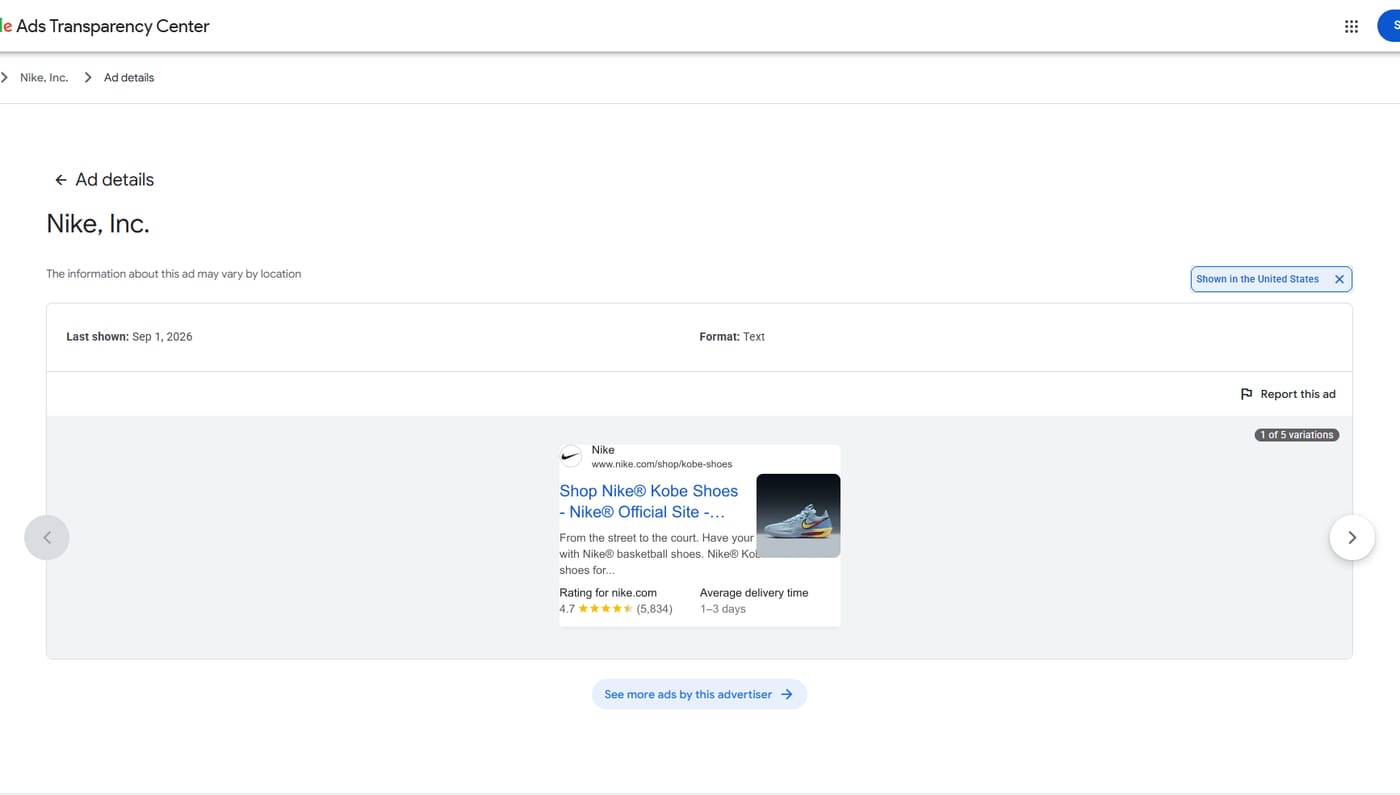
Section titled “What Google ads transparency shows for a US ad and for an EU ad”The same advertiser looks very different depending on where the ad ran. For a Nike text ad shown in the United States, Google Ads Transparency Center gave us only the last shown date (1 September 2026), the format and the ad itself, with “1 of 5 variations”.
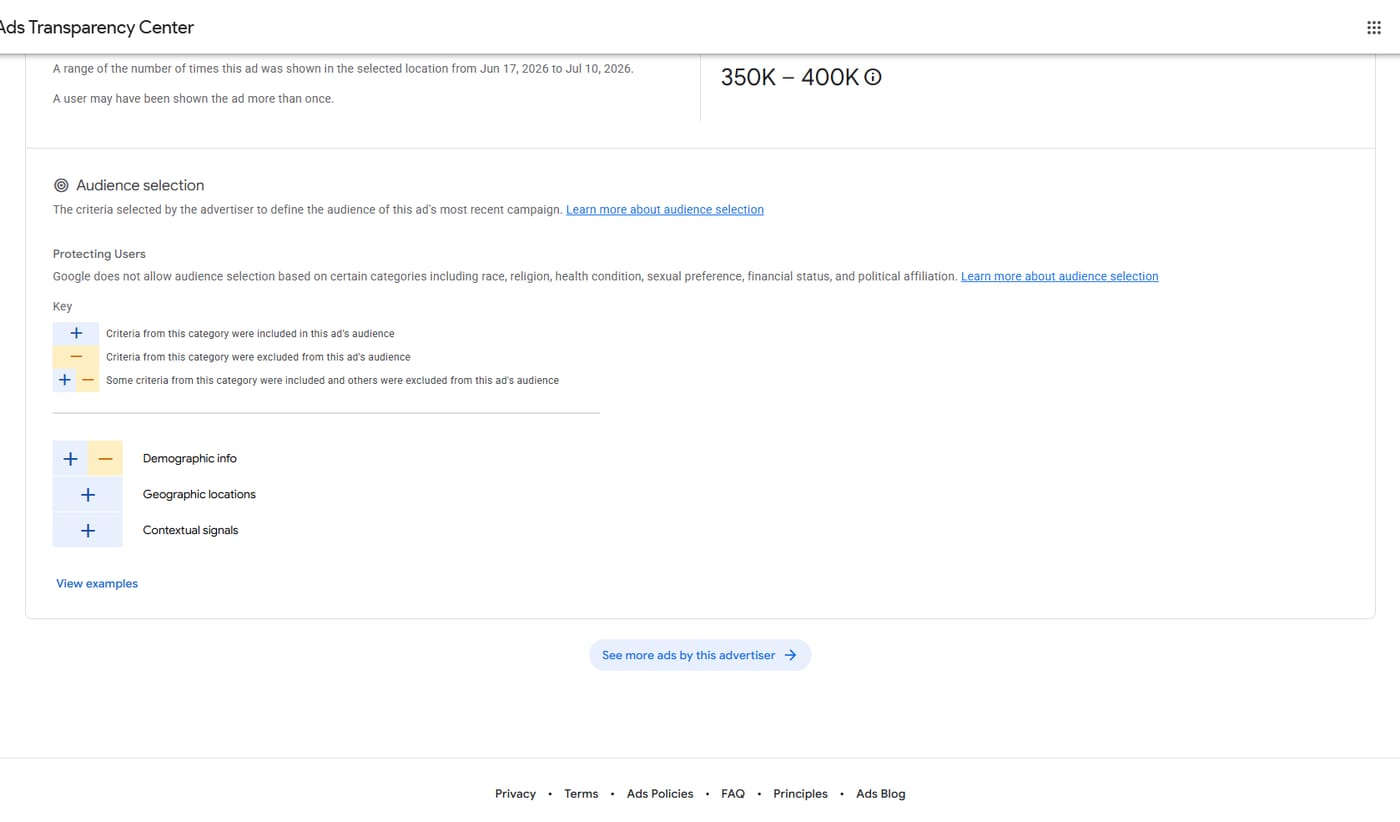
For a Nike video ad shown in France, the same tool added a times-shown range of 350K–400K for 17 June to 10 July 2026 and an “Audience selection” block that shows which targeting categories were used — demographic info, geographic locations and contextual signals — without revealing the values chosen.
How long Google keeps ads in the Transparency Center
Section titled “How long Google keeps ads in the Transparency Center”Google Ads Transparency Center keeps a commercial ad for one year from the date it was last displayed and an election ad for up to seven years. New ads take 48–72 hours to appear, dates use the Pacific Time Zone, and an advertiser page is missing entirely if the advertiser is not yet verified or ran no ads in the last 365 days.
Impression ranges are published with a 90-day delay, and none exist for any period before 1 March 2023. If you need to see what an advertiser ran last week, the ad itself will be there within three days; how many times it was shown will not be there for three months.
Google political ad library
Section titled “Google political ad library”Election ads have a separate section, the Political Advertising Transparency Report. It is the only place where Google shows money: amount spent and times shown, both as ranges, with a data export. Google stopped serving political ads in the EU before the EU’s political advertising regulation took effect in October 2025, so the political report has no current EU ads.
API and data downloads
Section titled “API and data downloads”Google offers API access only for ads served in the EEA. The same data is a public BigQuery dataset covering advertisers that served ads in the EEA or Türkiye; it needs a Google account and a Google Cloud project and fits within BigQuery’s free 1 TB per month. The full dataset can also be downloaded as JSON from Google Cloud Storage. There is no public API for ads that ran only in the US.
Where Google Ads Transparency Center stops
Section titled “Where Google Ads Transparency Center stops”Four gaps matter for anyone researching competitors. There is no spend for commercial ads anywhere. Ads are static screenshots and do not click through to the landing page. Only up to 5 common variations of an ad are shown. Agencies are never named, only the advertiser and the payer.
If you need landing pages or spend estimates for Google and YouTube ads, that is the territory of paid ad-intelligence tools. PowerAdSpy, for example, covers Google Display from its Standard plan and adds Google search ads and YouTube from its Platinum plan, according to its in-app plans page on 8 October 2026. Spytrend, which the team behind this site publishes, covers Facebook and TikTok and does not cover Google ads, so it does not help here. For the Meta side, see our Meta Ad Library guide.
Is Google Ads Transparency Center free?
Section titled “Is Google Ads Transparency Center free?”Yes. Google Ads Transparency Center is free and anyone can search it without an account; signing in is needed only to view age-restricted ads. Google’s terms limit use to information and research, so selling or monetizing the content you pull from it is not allowed.
What is Google Ads Transparency Center?
Section titled “What is Google Ads Transparency Center?”Google Ads Transparency Center is Google’s public ad library. It shows ads served on Search, YouTube, Play, Maps and Shopping by verified advertisers worldwide, plus unverified advertisers in Europe and Türkiye, with each advertiser’s name, location and payer, and keeps commercial ads for one year after they last ran.
Is there a Google ads library?
Section titled “Is there a Google ads library?”Yes. Google’s ad library is called Google Ads Transparency Center, at adstransparency.google.com. It works by advertiser or website rather than by keyword: you type a brand name or a domain and get every ad that advertiser has served, which you can then filter by date, region, platform and format.
Can you see how much an advertiser spends on Google Ads?
Section titled “Can you see how much an advertiser spends on Google Ads?”Only for election ads. Google Ads Transparency Center shows amount spent, as a range, in its separate political advertising report. For ordinary commercial ads it publishes no spend at all, and impressions appear only as ranges, with a 90-day delay, for ads that are covered by the European rules.
Are Google Ads Transparency Center and the Meta Ad Library the same thing?
Section titled “Are Google Ads Transparency Center and the Meta Ad Library the same thing?”No. They are separate tools run by different companies. Google Ads Transparency Center covers ads on Google’s own surfaces such as Search and YouTube and is searched by advertiser or website; the Meta Ad Library covers Facebook, Instagram, Messenger and Threads ads and can be searched by any keyword.